Get Organized, Save Time & Avoid Costly Mistakes - Starting at Just $99

CabinetCRUNCHER
CabinetCRUNCHER
  • Home
  • Software Products
    • Cabinet Cutlist Software
    • Cabinet Design Software
    • Cabinet Door Calculator
    • Cabinet Drawer Calculator
  • Buy Now
  • Free Trial Versions
  • System Requirements
  • Contact
  • Common Questions
  • Videos
  • Our Customers
  • Construction Guide
  • More
    • Home
    • Software Products
      • Cabinet Cutlist Software
      • Cabinet Design Software
      • Cabinet Door Calculator
      • Cabinet Drawer Calculator
    • Buy Now
    • Free Trial Versions
    • System Requirements
    • Contact
    • Common Questions
    • Videos
    • Our Customers
    • Construction Guide
  • Sign In
  • Create Account

  • Orders
  • My Account
  • Signed in as:

  • filler@godaddy.com


  • Orders
  • My Account
  • Sign out

Signed in as:

filler@godaddy.com

  • Home
  • Software Products
    • Cabinet Cutlist Software
    • Cabinet Design Software
    • Cabinet Door Calculator
    • Cabinet Drawer Calculator
  • Buy Now
  • Free Trial Versions
  • System Requirements
  • Contact
  • Common Questions
  • Videos
  • Our Customers
  • Construction Guide

Account

  • Orders
  • My Account
  • Sign out

  • Sign In
  • Orders
  • My Account

CabinetVIEW | Pro 3D Cabinet Design Software with SketchUp

The professional bridge between 3D design and the workbench. Use SketchUp to visualize and CabinetCRUNCHER to build.

Stop spending hours drawing every cabinet detail from scratch. CabinetVIEW is a comprehensive design system featuring over 2,000 ready-to-use SketchUp models engineered specifically for custom cabinetmakers, contractors, and dedicated DIYers.


Whether you are creating a stunning 3D rendering for a client or laying out a complex kitchen floor plan, CabinetVIEW provides the visual tools you need to move faster. These SketchUp models are built to work in perfect harmony with the CabinetCRUNCHER Cutlist Calculator.


Use SketchUp for what it’s best at—the visual layout—and let CabinetCRUNCHER handle what it's best at—the precision math and project data. It’s the smartest, most flexible way to bridge the gap between your design and your shop. 

Download Free Trial

Getting Started From 3D Design to Shop-Ready Cut Lists

CabinetVIEW is fully integrated and included with the CabinetCRUNCHER app.  

From Cabinet Design to CONSTRUCTION in 3 Easy Steps

Selecting dynamic 3D cabinet models from the CabinetVIEW library for SketchUp kitchen design.

Step 1: Select Your Models

Choose from our library of over 2,000+ SketchUp components. Whether you’re building standard base cabinets, complex corner units, or custom pantry built-ins, simply "drag and drop" the professional models you need into your design. No more drawing parts from scratch. 

Visualizing a custom kitchen floor plan with 3D cabinet models for client design presentations.

Step 2: Define Your Layout

Arrange the models to fit your floor plan and adjust the overall dimensions to match your project's requirements. Use SketchUp’s visual power to create stunning 3D renderings and ensure everything fits perfectly in the space before you ever cut a single board. 

Excel-based cabinet cut list calculator generating automated project data and material requirements.

Step 3: Generate Your Project Data

Step 3: Generate Your Project Data

This is where the magic happens. Use the project dimensions from your layout to drive the CabinetCRUNCHER Excel Engine. Instead of manually measuring every 3D part, you simply input your shop’s construction standards into Excel. Instantly, you’ll have a 100% accurate cut list, hardware requirements, labor estimates, and a total project budget. 

Design to Build: CabinetVIEW & CabinetCRUNCHER Together

Two specialized tools, one seamless result. Visualize with SketchUp, calculate with Excel, and build

The Workflow: Visual Design Meets Precision Math


While CabinetVIEW and CabinetCRUNCHER serve different roles, they work in tandem to eliminate guesswork. By separating Visualization from Calculation, you get a faster workflow without the "heavy" lag of traditional CAD software.


CabinetVIEW: The Visual Architect


  • Purpose: 3D Layout and Design.
  • The Advantage: Quickly create beautiful room settings and explore concepts. Whether you're designing a kitchen or a custom mudroom, you can see how components interact with the space before a single board is cut.
  • Smart Modeling: Stop over-modeling. Most professionals use our Layout Models to set the room and visualize the project in record time. Since CabinetCRUNCHER handles the engineering in the background, you don't need to draw every dado and rabbet just to get a perfect cutlist. Only use our Construction Models when you need a deep-dive visual of the cabinet joinery. 


CabinetCRUNCHER: The Engineering Brain


  • Purpose: The Project "Calculator."
  • The Advantage: Once your design is set in CabinetVIEW, enter your dimensions into CabinetCRUNCHER. It instantly generates 100% accurate cut lists, hardware requirements, and cost estimates.
  • Efficiency: Because CabinetCRUNCHER handles the math, you don’t need to spend hours meticulously modeling every cabinet detail in 3D. The "Engineering DNA" is already in the spreadsheet.


How They Work Together in Your Shop


Think of CabinetVIEW as your "Sales & Design" tool and CabinetCRUNCHER as your "Shop Foreman."


  1. Layout: Arrange your cabinets in SketchUp using the CabinetVIEW library to finalize the design with your client.
  2. Sync: Take the final dimensions from your SketchUp layout and enter them into the CabinetCRUNCHER app.
  3. Build: Print your precision cutlists and assembly notes. Because CabinetCRUNCHER uses your specific construction preferences, the output is tailored to your shop’s exact way of building.


Pro-Tip on Integration: While there is no "live link" between the two (meaning changes in 3D don't automatically change the spreadsheet), this manual "check-and-balance" is preferred by many pros. It ensures that you have a moment to review your dimensions before committing to a final cut list.


The Result: The Best of Both Worlds

  • Design Flexibility: Explore endless layout possibilities in a visual environment.
  • Technical Accuracy: Ensure every cut is perfect and every material cost is accounted for.
  • Time Savings: Avoid "over-modeling." Spend less time at the computer and more time at the workbench. 

Customer review: Using CabinetVIEW .skp models with CabinetCRUNCHER for precise cut list generation.

CabinetVIEW: 3D Cabinet Design Software for Building Custom Cabinets

Modifying toe kick dimensions and height in a 3D cabinet model for custom installation needs.
Customer testimonial: Finding the perfect balance between 3D design and automated cabinet cut lists.
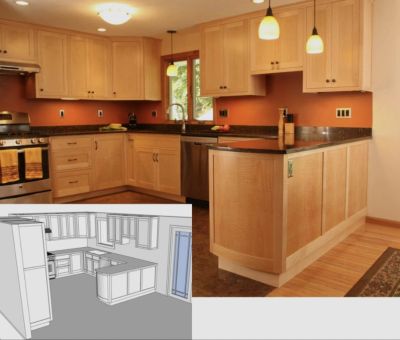
Professional kitchen cabinet layout software for designing 3D floor plans and automated cut lists.

Turn SketchUp Designs into Shop-Ready Reality

Fast & Easy: Pro Cabinet Design Without the Learning Curve

SketchUp kitchen installation showing precise cabinet placement and alignment using CabinetVIEW.

SketchUp offers an intuitive and easy-to-learn interface, but CabinetVIEW and CabinetCRUNCHER take that simplicity to a professional level. By integrating our library of 2,000+ "Smart Models" directly into SketchUp, we eliminate the steep learning curve of drawing from scratch.


Instead of mastering complex CAD commands, you simply drag and drop CabinetVIEW templates to create your layout, then use the CabinetCRUNCHER engine to handle the technical math. This streamlined approach makes it easy for both beginners and pros to move from a blank screen to a professional, shop-ready design with maximum efficiency.

Precision from Concept to Construction

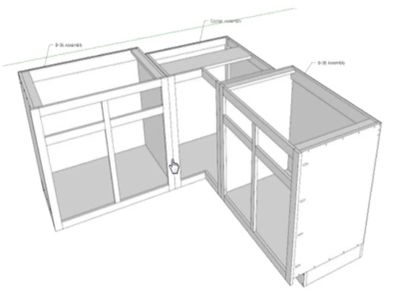
SketchUp blind corner cabinet model with CabinetVIEW, showing the blind panel and stile layout.

For cabinetmakers, precision is the foundation of profit. SketchUp excels in delivering exact architectural measurements, allowing you to draw to scale and resolve complex layouts in 3D. 


This visual precision is then finalized in the CabinetCRUNCHER cutlist calculator. While SketchUp and CabinetVIEW help you visualize the perfect fit for the room, CabinetCRUNCHER calculates the perfect fit for every cabinet component. Together, this system ensures that your 3D design translates into a flawless, shop-ready cutlist, virtually eliminating the risk of costly mistakes.

Custom Flexibility for Face Frame & Frameless Design

SketchUp face frame cabinet layout showing stile and rail dimensions using CabinetVIEW components.

SketchUp offers incredible flexibility for custom design, but CabinetVIEW and CabinetCRUNCHER provide the professional framework to make it buildable. Whether you are designing Face Frame or Frameless cabinetry, the CabinetVIEW library provides pre-configured 3D models for both styles, allowing you to quickly adapt to any material, texture, or finish.


This flexibility is backed by the power of CabinetCRUNCHER, which handles the technical construction logic for every element—from complex kitchen islands to simple bookcases. Together, they allow you to design with total creative freedom in SketchUp while ensuring your final project is supported by the precision engineering and accurate cutlists required for a professional build.

Beyond the 3D Warehouse: Pro Construction-Ready Models

Pro construction-ready cabinet models in SketchUp with accurate joinery and hardware placement.

While SketchUp’s 3D Warehouse offers thousands of free models, CabinetVIEW and CabinetCRUNCHER provide something far more valuable: construction-ready intelligence. Instead of struggling with generic shapes, you can drag and drop 2,000+ "Smart Models" designed specifically for the way you build.


Every CabinetVIEW component is engineered to work in tandem with the CabinetCRUNCHER app. This means when you modify a model to fit your design, you aren't just changing a picture—you are preparing your project with a very professional, and accurate cutlist. It’s the perfect blend of 3D Warehouse convenience and shop-floor precision. 

Visualize with Confidence: From 3D Rendering to Shop Floor

Detailed 3D cabinet assemblies featuring precise dados, rabbets, and face frame specifications.

SketchUp’s 3D capabilities are the ultimate way to visualize your project, but CabinetVIEW and CabinetCRUNCHER turn those visuals into a reality you can actually build. By using the CabinetVIEW library, you can instantly generate photo-realistic renderings that show exactly how your cabinets will fit within a room setting.


This visual clarity allows you to make design adjustments on the fly, while the CabinetCRUNCHER engine ensures every change is technically sound and ready for the shop. Together, they give you the confidence that the final product will not only meet your client’s expectations but will be 100% accurate when it hits the workbench.

A Seamless Workflow: Design to Build in Minutes

User-friendly SketchUp cabinet design using CabinetVIEW for fast, accurate 3D construction.

SketchUp serves as the perfect foundation for a professional workflow, integrating seamlessly with CabinetVIEW and CabinetCRUNCHER to bridge the gap between design and construction. This powerful combination allows you to transition smoothly from a creative 3D concept to a physical build without losing precision along the way.


By using CabinetVIEW to build your layout in SketchUp, you create a visual map that the CabinetCRUNCHER engine then transforms into a complete project plan. In minutes, you can move from a 3D model to precise cut lists, material estimates, and total project costs—ensuring your shop remains as efficient as your design process.

Why Excel Beats Standard SketchUp Extensions

Stop Fighting Your 3D Models. Start Building.

The Smart Way to Bridge Design and Construction

The Smart Way to Bridge Design and Construction

Graphic comparing Excel’s powerful calculation engine to standard SketchUp visual-only extensions.

Most SketchUp extensions are "reporting" tools—they can only give you a cut list if you have manually drawn every joint with 100% perfection. One modeling error results in wasted time and materials.


CabinetCRUNCHER changes the game by separating the 'Visual' from the 'Logic'. Use our library of 2,000+ SketchUp models for your floor plans and 3D renderings, but let the Excel engine handle the precision math. You can adjust your shop’s joinery, hardware clearances, and construction standards in Excel without ever having to redraw your 3D model. It’s a faster, more forgiving, and more powerful way to work.

The Smart Way to Bridge Design and Construction

The Smart Way to Bridge Design and Construction

The Smart Way to Bridge Design and Construction

Why Excel is superior for complex cabinet cut list logic and material cost estimations.

  • Standard Extensions: Require "Perfect" 3D models to get accurate lists.
  • CabinetCRUNCHER: Define your construction "DNA" in Excel; no tedious modeling required.
  • Standard Extensions: Give you a list of parts, but no business data.
  • CabinetCRUNCHER: Provides full material costing, labor hours, and budgeting.
  • Standard Extensions: Difficult to change joinery mid-project.
  • CabinetCRUNCHER: Change a setting in Excel and the whole project updates instantly.

Visual Construction: 3D Models Match Your build PREFERENCES

Visual Construction: High-Detail 3D Templates

For woodworkers who prefer a highly visual design process, our library includes "Construction Models" that show the exact internal joinery of your project. These models provide a 3D view of how your cabinets are built—clearly showing details like dadoed back panels versus rabbeted or butted joints.


Designed for Compatibility: Every construction option in our SketchUp library is perfectly synced with the settings in the CabinetCRUNCHER Excel engine. While most cabinetmakers find it much faster and easier to manage these details directly in Excel, these high-detail models are available whenever you need a visual "road map" of how a complex unit comes together.


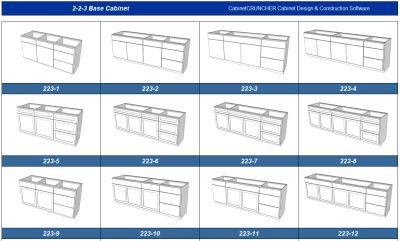
Use the tables below to see the specific build configurations available for each cabinet type.

Visual construction templates for SketchUp providing a digital blueprint for cabinet assembly.
CabinetVIEW settings menu for configuring base, built-in, and free-standing cabinet construction.

CabinetVIEW Construction Options for Building Base Cabinets, Built-In Cabinets, Free-Standing Cabinets

CabinetVIEW gives you the professional flexibility to build exactly how you work. Unlike "static" libraries, our software adapts to your specific shop standards for Base, Built-In, and Free-Standing cabinetry.


The table above outlines our various Cabinet Base and Back Panel configurations—including butted, dadoed, and rabbeted options. Each selection is supported by a dedicated 3D construction model that can be instantly resized and reconfigured, ensuring your 3D plan matches your physical build perfectly.

Custom 3D templates for upper wall cabinets and kitchen hutches with adjustable joinery settings.

Construction Models for Wall Cabinets & Hutches

CabinetVIEW offers a dedicated suite of models for overhead and furniture-style cabinetry, ensuring your wall units are as structurally sound as they are beautiful. From standard upper cabinets to elegant glass-front hutches, our library provides the specific joinery details required for secure mounting and professional finishes.


Use the table above to explore your options for Top and Bottom Panel configurations and Back Panel joinery. Whether you are building with traditional face frames or modern frameless styles, these 3D templates can be easily adjusted to fit your exact height, width, and depth requirements.

Which Model Should You Use?

Standard Layout Models

Comparison of standard 3D layout models versus high-detail construction models with shop joinery.

Best For - Fast kitchen layouts and client presentations.

Visual Detail - Shows exterior "envelope" (doors, drawers, frames).

Speed - Lightning Fast. Best for layout design and planning large multi-cabinet rooms. 

Excel Sync - 100% Compatible with CabinetCRUNCHER. 

Modifications - Easy to resize and move. 


The Professional’s Choice: Most users use Standard Models to build their 3D floor plan quickly, then let the CabinetCRUNCHER Excel Engine calculate the joinery and cut lists. You only need to use the Construction Models when you want a 3D "visual map" of how a specific joint comes together.   

High-Detail Construction Models

Standard 3D cabinet blocks compared to high-fidelity models showing dados, rabbets, and parts.

Best For -  Visualizing assembly and complex joinery. 

Visual Detail -  Shows internal joints (dados, rabbets, shelf holes). 

Speed -  High Detail. Best for single, complex units. 

Excel Sync - 100% Compatible with CabinetCRUNCHER. 

Modifications -  Easy to resize; shows joinery updates in 3D. 

3D Models for Cabinetmaking & General Woodworking Projects

Professional 3D models for cabinetmaking and woodworking projects with automated joinery details.
SketchUp woodworking templates for custom furniture, built-ins, and professional cabinetmaking.
Customer review: How CabinetCRUNCHER took the guesswork out of my DIY home cabinetry project.

Frequently Asked Questions

Please check the Frequently Asked Questions on each of the product pages. If you cannot find an answer to your question, please contact us at sales@cabinetcruncher.com, or phone 206-818-0109.

Not at all. We’ve done the heavy lifting for you. Since you are using our library of 2,000+ pre-built models, you don't need to know how to draw complex joinery or parts. You simply "drag and drop" the cabinets you need and resize them to fit your floor plan. 


CabinetVIEW provides the visual 3D models and layout. To generate the professional cut list, material quantities, and cost reports, you use the CabinetCRUNCHER Excel engine. By keeping the "Visuals" in SketchUp and the "Math" in Excel, you get much higher accuracy and more flexibility than a standard 3D extension can provide. 


While there are several cutlist extensions available for SketchUp, they generally operate as "reporters"—they simply list the dimensions of the shapes you have drawn. CabinetCRUNCHER is a professional engineering engine that actually "thinks" like a cabinetmaker.


Here is why professional shops and serious woodworkers choose CabinetCRUNCHER over basic extensions:


  • Engineering vs. Measuring: A standard extension only measures what you drew. If you forgot to account for a dado depth or a scribe overlap in your model, the extension will give you the wrong size. CabinetCRUNCHER uses built-in logic to automatically calculate joinery, overlaps, and reveals based on your specific shop standards.
  • Complex Joinery Logic: Most extensions struggle with complex details like beaded face frames, tenons, or specific rabbet depths. CabinetCRUNCHER allows you to define these settings once; the software then applies that math perfectly to every cabinet in your project.
  • The "Excel" Advantage: Unlike extensions that produce a static text file, CabinetCRUNCHER lives in Excel. This gives you powerful tools for material optimization, hardware tracking, and project costing that simple design plugins cannot match.
  • Design Flexibility: With a basic extension, if you change a cabinet width, you have to manually "stretch" every part of the 3D model perfectly or the cutlist breaks. With CabinetCRUNCHER, you simply update the dimension, and the entire engineering for that cabinet—including all internal parts—recalculates instantly.
  • Error Prevention: CabinetCRUNCHER acts as a safety net. It validates your dimensions to ensure that parts actually fit together, helping you catch expensive mistakes before you cut a single piece of expensive hardwood.


The Bottom Line: If you want to spend your time drawing every single joint and dado by hand, an extension is fine. If you want to spend your time building cabinets with the confidence that your parts will fit the first time, you need the engineering power of CabinetCRUNCHER.


This is where our system shines. Unlike a standard extension—where you would have to redraw your entire 3D model to change a dado depth or a stile width—with our system, you simply change the setting in Excel. Your cut list updates instantly without you having to touch the SketchUp model. 


CabinetVIEW is designed to work with the desktop versions of SketchUp. Because these are standard SketchUp components (.skp files), they are highly compatible and easy to integrate into your existing design workflow. 


Yes! The models are clean, professional, and ready for presentation. You can use them to create beautiful 3D walkthroughs or floor plans to help your clients visualize their project and close the sale faster. 


No. Like all our software, CabinetVIEW is a one-time purchase. Once you buy the library, it belongs to your shop. There are no monthly "rent" payments required to access your designs. 


No. While we offer a massive library of SketchUp models for those who want 3D visuals, it is not required. CabinetCRUNCHER is a standalone Excel-based engine. You can take measurements from a hand-drawn sketch, a blueprint, or any other design software and plug them directly into Excel to generate your professional cut list and cost reports. 


Absolutely. If you prefer to design in AutoCAD, 2020 Design, Chief Architect, or even just use a pencil and paper, CabinetCRUNCHER still handles all the "heavy lifting." You simply enter your project’s primary dimensions and your shop's construction standards into the Excel engine to get your results. 


We intentionally kept the "Math" in Excel so you aren't a slave to your drawing. Most all-in-one programs require a perfect digital model to give you a list. Our system gives you the freedom to design however you want, while Excel ensures your math, joinery, and material requirements are 100% accurate every time. 


You are in good company. Many of our most successful users prefer to sketch their layouts by hand. As long as you have your "box" dimensions (Height, Width, Depth), you can plug them into CabinetCRUNCHER and get a full professional breakout including labor, hardware, and material costs in seconds. 


Yes, absolutely. Whether you are a professional contractor bidding on a large project or a homeowner tackling a full kitchen remodel, CabinetCRUNCHER is engineered for multi-cabinet projects.


Unlike basic calculators that only handle one cabinet at a time, our software allows you to:


  • Manage Entire Projects: Input all the cabinets for a kitchen, vanity, or built-in library into a single project file.
  • Consolidated Material Lists: Automatically combine requirements for all cabinets into one master list. You'll know exactly how many sheets of plywood and how many board feet of solid lumber you need to buy for the entire job.
  • Uniform Construction Standards: Set your shop standards once (like your favorite dado depth or drawer slide clearance), and apply them instantly to every cabinet in the kitchen for a consistent, professional build.
  • Total Project Budgeting: (Professional Series) Get a complete breakdown of the total labor, hardware, and material costs for the entire kitchen before you even buy your first board.


Whether you are using our 2,000+ SketchUp models to visualize the layout or just working from a hand-drawn floor plan, CabinetCRUNCHER provides the "mathematical brain" to ensure every cabinet in the kitchen fits perfectly and stays on budget.


The possibilities are nearly endless. While CabinetCRUNCHER is a powerhouse for kitchens, its flexible "Engineering DNA" allows you to design almost any type of carcass-based cabinetry or furniture.


Our users successfully design and build:


  • Bathrooms: Custom vanities, linen closets, and medicine cabinets.
  • Storage & Organization: Mudroom lockers, walk-in closets, and garage storage systems.
  • Living Spaces: Entertainment centers, bookcases, and fireplace mantels.
  • Home Office: Custom desks, filing cabinets, and library shelving.
  • Commercial Work: Breakroom cabinets, reception desks, and shop storage.


The Rule of Thumb: If it’s a project that involves a box-style construction with a face frame or frameless design—including doors, drawers, and adjustable shelving—CabinetCRUNCHER can handle the math.


Because you can customize the dimensions and construction rules for every individual piece, you aren't limited to "standard" sizes. If you can dream it, you can crunch the numbers for it.


Yes. Our library includes "Construction Models" that show exactly how the cabinet is assembled. We know that every woodworker has a preferred way of building. That’s why CabinetVIEW isn't just a static collection of shapes—it's a library of smart templates designed for real construction. If you need that level of detail in your 3D plan, you simply:


  • Choose Your Method: Select a model based on your specific construction style (e.g., choose between different cabinet base types or how the back panel is installed, such as butted, dadoed, or rabbeted).
  • Adjust the Details: Once you've selected the correct construction style, you can easily adjust the model to your desired size and configuration.


The Best of Both Worlds: You get a 3D model that actually looks like the cabinet you are going to build, which then works in perfect harmony with the CabinetCRUNCHER Excel engine to generate your final, precise cut list.


Copyright © 2026 CabinetCRUNCHER Cabinet Design & Construction Software.  All Rights Reserved.

  • Home
  • Cabinet Cutlist Software
  • Cabinet Design Software
  • Cabinet Door Calculator
  • Cabinet Drawer Calculator
  • Buy Now
  • System Requirements
  • Contact
  • Common Questions
  • Videos
  • Our Customers
  • Construction Guide