Precision for the Pro Shop - Simplicity for the Enthusiast

Why Cabinetmakers Choose DrawerCRUNCHER
Precision Drawer Box Cut Lists
Calculate accurate dimensions for drawer sides, fronts, backs, and bottoms.
Flexible Joinery Methods
Support dovetail, dado/rabbet, locking miter, box joint, and butt-joint construction.
Custom Shop Settings
Set material thicknesses, joinery dimensions, bottom clearances, and other construction requirements.
Hardware Compatibility
Adjust side and bottom clearances to match side-mount and undermount drawer slides.
Project-Level Production
Process multiple drawer boxes and roll-out trays and organize the resulting cut lists using Excel.
Fractional or Metric
Work in fractional inches, decimal measurements, or millimeters.
The 3-Step Workflow: From Dimensions to Production

The DrawerCRUNCHER workflow is identical to DoorCRUNCHER—designed to be simple, fast, and repeatable.
Step 1 — Enter or Import Your Drawer Dimensions
Enter or copy and paste finished drawer or roll-out tray dimensions and quantities. You can also import drawer box and roll-out tray sizes directly from CabinetCRUNCHER, just as you can with DoorCRUNCHER, eliminating duplicate data entry.
Step 2 — Set Your Construction Standards
Choose your joinery, material thicknesses, bottom settings, and hardware clearances. Apply your build standards across the entire project for consistent results, and easily change them later if your requirements change.
Step 3 — Generate Your Production Cut Lists
Automatically create your cut lists, material requirements, and project cost information. Use Excel's built-in filter and sort tools to organize and customize your production cut lists to match the way you build.

Adjusting Cut List Settings
DrawerCRUNCHER includes a wide variety of construction configurations for drawer boxes and roll-out trays. You can customize these configurations to almost any construction specification or hardware requirement for your woodworking project. For each drawer or tray, you can select from the following joinery types:
- Through Dovetail Joints
- Half-Blind Dovetail Joints
- Dado or Rabbet Construction
- Locking Miter Joints
- Box Joints
- Butt-Joints (Pocket Hole construction or mechanical fasteners)
Within each joinery type, you can adapt the configurations to support many different building styles and hardware clearances. For example, by adjusting the component offsets and dado depths, you can create professional results for any of the following applications:
- Standard Drawer Boxes (any depth or height)
- Under-mount Slide Drawers (with specific bottom clearances)
- Side-mount Slide Drawers (with precise side-clearance logic)
- Roll-out Trays / Pull-outs (with low-profile or scooped fronts)
- File Drawers and Specialized Storage
- Shop Utility Trays

Drawer Software Calculates Bill of Materials & Estimates Project Costs
Following the same format as DoorCRUNCHER, your professional cut list and material requirements are automatically generated on the Project Summary sheet, providing a comprehensive overview of your entire project:
- Project Information: Displays your specific project name and project number for easy filing and shop organization.
- Drawer & Tray Quantity: This section summarizes the total count of all drawer boxes and roll-out trays (slide-outs) for your entire project. This data is updated automatically based on the specifications entered in your worksheets.
- Production (Rip Length) Quantity: This section calculates the total lineal length for every width of side-panel material used. It is designed to help you prep your stock efficiently. Example: If your project requires 50 total lineal feet of 6” wide material, and your standard rip length is 10 feet, the software shows you need to prep 5 strips at that length.
- List of Materials: A complete summary of the type and quantity of all materials required, including lumber for drawer sides/fronts, sheet goods for bottom panels, and associated hardware.
- Project Cost: Summarizes your total material investment and includes customizable fields to track additional expenses such as production labor, finishing, hardware, and installation. You can easily modify these descriptions and costs to match your shop's pricing.
- Notes (Optional): A dedicated space for specific project instructions, assembly reminders, or client-specific details.

Precise Drawer Cut List for Your Entire Project in Minutes
This section automatically compiles every component from your entire project—including all drawer boxes and slide-out trays—into one comprehensive master cut list. By aggregating data from each of the Drawer Build Groups, DrawerCRUNCHER provides a bird's-eye view of your total material needs.
Shop-Ready Organization for Efficient Manufacturing
Don’t just read a list—organize your workflow. Use Excel's built-in filters to transform the way you build:
- Batch Processing: Filter by Material Type and then sort by Width. This allows you to set your table saw fence once and "rip" every drawer side, front, and back in the project at the same time, helping reduce setup time and cutting errors.
- Sequential Cutting: Sort by Length to streamline your cross-cutting at the miter saw. This ensures you process your longest components first, allowing you to use the remaining off-cuts for smaller parts and maximize your material yield.
- Material Grouping: Instantly isolate parts by material type (e.g., solid maple for dovetail boxes vs. plywood for utility trays) to organize your shop floor by station and assembly priority.
- Precision Organization: Every part is clearly labeled by its parent unit, ensuring that as you cut, you can easily sort and stack components for efficient assembly.
Comprehensive Features & Construction Capabilities
Build Drawer Boxes Your Way
Build a Wide Variety of Drawer Boxes and Roll-Out Trays
Create accurate cut lists for drawer boxes and roll-out trays in a variety of sizes and configurations to meet the requirements of your cabinet projects.
- Standard Drawer Boxes — Calculate components for drawers used with undermount or side-mount slides.
- Roll-Out Trays — Create pull-out trays for base cabinets, pantry cabinets, and other storage applications.
- Custom Configurations — Build file drawers, utility drawers, deep drawers, and other custom-sized drawer boxes.
- Flexible Construction — Choose the joinery and construction method that matches the way you build.
Flexible Drawer Box Joinery Methods
Choose the construction method that matches your shop, equipment, and drawer box requirements.
- Dovetail Construction — Support through dovetail and half-blind dovetail drawer boxes.
- Dado & Rabbet Construction — Build drawer boxes using dadoed or rabbeted joints.
- Locking Miter Construction — Create strong, clean-looking locking miter joints.
- Box Joint Construction — Use box joints for a traditional, durable drawer box assembly.
- Butt-Joint Construction — Build straightforward drawer boxes using simple butt-joint construction.
- Custom Construction Settings — Adjust dimensions and clearances to match your materials and building methods.
Precision Drawer Box Calculations & Customization
DrawerCRUNCHER calculates component dimensions based on your finished drawer or tray sizes, construction method, materials, and hardware requirements.
- Automatic Component Sizing — Calculate the exact dimensions for drawer sides, fronts, backs, and bottoms based on your finished box dimensions and construction settings.
- Custom Joinery Dimensions — Control joint dimensions, material thicknesses, and other construction details to match the way you build.
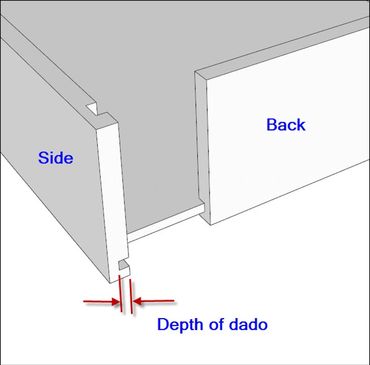
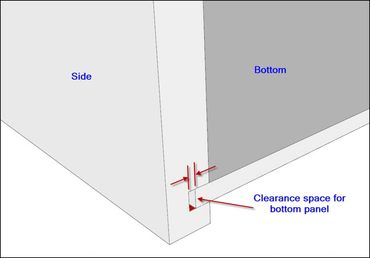
- Drawer Bottom Settings — Set bottom thickness, dado or rabbet dimensions, and bottom clearances to achieve the fit you need.
- Hardware Clearances — Adjust side and bottom clearances to match your drawer slides, including side-mount and undermount hardware.
- Fractional or Metric — Generate cut lists using fractional inches, decimal measurements, or millimeters.
Material Requirements & Production Planning
DrawerCRUNCHER helps you determine the materials and production quantities required for your drawer boxes and roll-out trays before you begin cutting.
- Material Quantities — Calculate the lumber, sheet goods, and other materials required for your project.
- Board Foot & Sheet Requirements — Determine hardwood board footage and sheet-stock quantities based on your project requirements.
- Lineal Foot & Rip Requirements — Calculate lineal footage and rip quantities to help organize material preparation and purchasing.
- Production Planning — Use calculated material and production requirements to plan your cutting and improve material preparation.
Simple Excel-Based Workflow
DrawerCRUNCHER uses a familiar Excel-based interface, making it easy to enter drawer dimensions, adjust construction settings, and organize production information without specialized CAD software.
- Familiar Interface — Enter dimensions and settings in a straightforward spreadsheet format.
- Easy to Customize — Adjust your construction requirements and shop standards directly in the worksheet.
- Organize Your Results — Use Excel's sorting and filtering tools to organize cut lists and production information.
Add Labor, Hardware & Other Project Costs

Build More Accurate Project Estimates
In addition to calculating the materials required to build your drawer boxes and roll-out trays, DrawerCRUNCHER lets you include the other costs associated with your project.
- Labor Costs — Enter your shop labor rate and estimated production time.
- Hardware Costs — Include drawer slides and other hardware in your project costs.
- Additional Expenses — Add finishing, installation, or other project-specific costs.
- Project Totals — Review your material, labor, hardware, and other costs together when preparing your project estimate.
Save Time & Reduce Costly Mistakes!