Save Time & Eliminate Costly Mistakes!
Precision for the Pro Shop - Simplicity for the Enthusiast

Professional Results Made Simple: Why Woodworkers Choose DrawerCRUNCHER
Built for Your Shop: Flexible Joinery & Effortless Operation
DrawerCRUNCHER adapts to your signature building style, allowing you to maintain your craftsmanship while the software handles the tedious math. Whether you are building high-end dovetailed boxes or utility-grade shop trays, the process is simple, fast, and highly customizable.
Supports All Industry-Standard Methods:
- Traditional Joinery: Effortlessly calculate offsets for Through Dovetails, Half-Blind Dovetails, and Box Joints.
- Shop-Standard Construction: Quickly generate lists for Dado and Rabbet joints, Locking Miters, or simple Butt-Joint assembly.
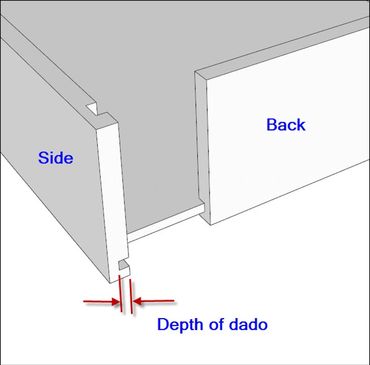
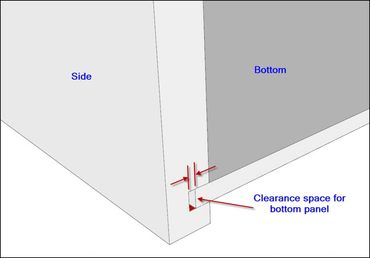
- Customizable Bottoms: Define your specific dado depth and required "rattle room" expansion clearance; the software automatically calculates the final panel size.
- Total Material Control: Use any thickness or species. Mix and match materials—like solid maple sides with pre-finished birch bottoms—to suit your project needs.
Easy to Learn, Even Easier to Use:
- No Steep Learning Curve: There are no complex CAD menus to navigate. If you can enter a number into a spreadsheet cell, you can use DrawerCRUNCHER.
- Highlighted Data Entry: Simply fill in the clear, color-coded fields. The software "crunches" the numbers and updates your entire project list and material costs instantly.
- Helpful On-Screen Guidance: Technical comments and diagrams are built right into the spreadsheet to guide you through hardware clearances and joinery settings as you work.
The 3-Step Workflow: From Dimensions to Production

The DrawerCRUNCHER workflow is identical to DoorCRUNCHER—designed to be simple, fast, and repeatable.
- Step 1: Enter Your Box Sizes - Simply enter (or copy and paste from CabinetCRUNCHER) your finished box dimensions and quantities. The software instantly applies your joinery and material offsets to every item on the list.
- Step 2: Define Your Shop Standards - Enter your preferred construction settings. Select your joinery type (dovetails, dadoes, etc.), material thicknesses, and bottom panel clearances. These settings become your global "shop standard" for the entire project.
- Step 3: Print Your Production Reports - DrawerCRUNCHER automatically generates a clean, fractional or metric cut list for the shop floor, a master material list for procurement, and a detailed cost estimate to keep your project on budget.

Adjusting Cut List Settings
DrawerCRUNCHER includes a wide variety of construction configurations for drawer boxes and roll-out trays. You can customize these configurations to almost any construction specification or hardware requirement for your woodworking project. For each drawer or tray, you will select from the following industry-standard joinery types:
- Through Dovetail Joints
- Half-Blind Dovetail Joints
- Dado or Rabbet Construction
- Locking Miter Joints
- Box Joints
- Butt-Joints (Pocket Hole construction or mechanical fasteners)
Within each joinery type, you can adapt the configurations to support many different building styles and hardware clearances. For example, by adjusting the component offsets and dado depths, you can create professional results for any of the following applications:
- Standard Drawer Boxes (any depth or height)
- Under-mount Slide Drawers (with specific bottom clearances)
- Side-mount Slide Drawers (with precise side-clearance logic)
- Roll-out Trays / Pull-outs (with low-profile or scooped fronts)
- File Drawers and Specialized Storage
- Shop Utility Trays

Drawer Software Calculates Bill of Materials & Estimates Project Costs
Following the same format as DoorCRUNCHER, your professional cut list and material requirements are automatically generated on the Project Summary sheet, providing a comprehensive overview of your entire project:
- Project Information: Displays your specific project name and project number for easy filing and shop organization.
- Drawer & Tray Quantity: This section summarizes the total count of all drawer boxes and roll-out trays (slide-outs) for your entire project. This data is updated automatically based on the specifications entered in your worksheets.
- Production (Rip Length) Quantity: This section calculates the total lineal length for every width of side-panel material used. It is designed to help you prep your stock efficiently. Example: If your project requires 50 total lineal feet of 6” wide material, and your standard rip length is 10 feet, the software shows you need to prep 5 strips at that length.
- List of Materials: A complete summary of the type and quantity of all materials required, including lumber for drawer sides/fronts, sheet goods for bottom panels, and associated hardware.
- Project Cost: Summarizes your total material investment and includes customizable fields to track additional expenses such as production labor, finishing, hardware, and installation. You can easily modify these descriptions and costs to match your shop's pricing.
- Notes (Optional): A dedicated space for specific project instructions, assembly reminders, or client-specific details.

Precise Drawer Cutting List for Your Entire Project in Minutes
This section automatically compiles every component from your entire project—including all drawer boxes and slide-out trays—into one comprehensive master cut list. By aggregating data from each of the Drawer Build Groups, DrawerCRUNCHER provides a bird's-eye view of your total material needs.
Shop-Ready Organization for Efficient Manufacturing
Don’t just read a list—organize your workflow. Use Excel's built-in filters to transform the way you build:
- Batch Processing: Filter by Material Type and then sort by Width. This allows you to set your table saw fence once and "rip" every drawer side, front, and back in the project at the same time, significantly reducing setup time and errors.
- Sequential Cutting: Sort by Length to streamline your cross-cutting at the miter saw. This ensures you process your longest components first, allowing you to use the remaining off-cuts for smaller parts and maximize your material yield.
- Material Grouping: Instantly isolate parts by material type (e.g., solid maple for dovetail boxes vs. plywood for utility trays) to organize your shop floor by station and assembly priority.
- Precision Organization: Every part is clearly labeled by its parent unit, ensuring that as you cut, you can easily sort and stack components for efficient assembly.
From Estimate to Invoice: Professional Project Costing

Profitability at a Glance: Your Complete Project Management Dashboard
DrawerCRUNCHER is more than just a cut list generator; it is a complete Project Management Dashboard. Instead of guessing your margins, you can instantly see the financial health of your project before you ever make the first cut.
- Automated Material Costing: Instantly calculate costs for both solid lumber (Board Feet) and sheet goods (Sheets) based on the specific dimensions of your drawer boxes and trays.
- Labor & Overhead Tracking: Factor in production labor by the hour or rate, alongside specific drawer expenses like slide hardware, specialty joinery time, and finishing.
- Precision Bidding: Use integrated metrics to ensure your quotes are consistent, competitive, and—most importantly—profitable.
- Accurate Lumber Ordering: Eliminate waste and "extra trips" to the lumberyard with calculated Lineal Footage and Rip Quantities based on your specific stock lengths.
- Total Project Transparency: See your total project cost at a glance, allowing for instant adjustments to labor rates or material choices to meet a client's budget without sacrificing your bottom line.
The 3-Step Guide to Profitable Quoting
One of the biggest challenges for small shops and DIYers is "hidden costs." DrawerCRUNCHER eliminates the guesswork by providing a real-time financial breakdown of your project, ensuring you account for every slide, screw, and board foot.
1. Automated Material Quantities
Stop manual board-foot calculations. Once your drawer or tray sizes are entered, the dashboard instantly provides:
- Material Requirements: Exact board footage for solid wood (e.g., Maple sides) and sheet material for the bottom panels.
- Specific Rip Lists: It tells you exactly how many lineal feet you need and how many physical boards (Rip Qty) to buy based on your standard stock length (e.g., 8-foot or 10-foot boards).
2. Comprehensive Labor & Overhead
A profitable job must account for your time and the hardware that goes into it. The dashboard allows you to:
- Calculate Labor: Enter your hourly rate and estimated build time to see a total production labor cost (e.g., 12 hours at $65/hr).
- Factor in Hardware & Extras: Easily add line items for drawer slides, pulls, finishing, and installation. Since drawer hardware is often a major expense, this ensures you never leave money on the table.
3. Real-Time Margin Analysis
Before you send the quote, verify your numbers with the Project Totals:
- Total Project Cost: See your bottom-line investment immediately (e.g., $845.50).
- Average Cost per Unit/Sq Ft: These powerful metrics allow you to see exactly what each drawer box costs to produce. Use this data to ensure your pricing is consistent, competitive, and—most importantly—profitable for your shop.
The DrawerCRUNCHER Profitability Checklist
One of the biggest challenges for small shops and DIYers is "hidden costs." DrawerCRUNCHER eliminates the guesswork by providing a real-time financial breakdown of your project.
1. Material Precision
- Verify Waste Percentage: Did you add a 10-15% buffer to the Board Footage to account for knots, grain matching, or shop errors?
- Sheet Good Yield: If the dashboard shows 1.1 sheets, ensure you have quoted for 2 full sheets, as most suppliers won't sell partial panels.
- Current Market Pricing: Check the Cost column against today’s lumber prices for your species (e.g., Cherry) to ensure your "Adjust Material Cost" is accurate.
2. Labor & Production
- Prep & Cleanup: Does your Production Labor quantity include time for setting up the router table, cleaning up glue squeeze-out, and final sanding?
- Finishing Time: If you are finishing the doors in-house, ensure the Finishing line item covers both the material (stain/topcoat) and the spray time.
3. The "Hidden" Costs
- Hardware Check: Did you include the cost of hinges, pulls, or drawer slides in the Hardware field?
- Delivery & Install: If you are doing the install, factor in travel time and site supplies (screws, bumpers, shims) under Installation.
4. Workflow Optimization
- Rip Quantity Check: Review the Rip Qty to see if you have enough physical boards on hand to complete all the stiles and rails in a single production run.
- Batching Strategy: Look at your Lineal Ft requirement; can you combine these cuts with another project to further reduce your waste?
5. Final Margin Audit
- The "Sanity Check": Compare your Average Cost per Sq Ft to your shop's standard minimum. If your calculated cost of $29.75 is lower than your target, adjust your labor rate or material markup accordingly.