Cabinet Cut List & 3D Design Software for Custom Cabinetmakers
Generate cabinet cut lists, material lists and estimates for face-frame and frameless cabinets—with 3D design in SketchUp.

Generate cabinet cut lists, material lists and estimates for face-frame and frameless cabinets—with 3D design in SketchUp.

CabinetCRUNCHER provides cabinet cut lists, material lists and estimating tools for custom cabinetmakers, while integrated CabinetVIEW adds 2,000+ SketchUp cabinet models for 3D design and visualization.
Fast, Easy and Precise — built to match the way you build.

CabinetCRUNCHER is professional cabinet cut list and estimating software for building custom cabinets, including kitchens, islands, vanities, built-ins and specialty cabinetry. It generates detailed cut lists, material lists and project costs for both face-frame and frameless cabinets. Built for flexibility, CabinetCRUNCHER supports a wid
CabinetCRUNCHER is professional cabinet cut list and estimating software for building custom cabinets, including kitchens, islands, vanities, built-ins and specialty cabinetry. It generates detailed cut lists, material lists and project costs for both face-frame and frameless cabinets. Built for flexibility, CabinetCRUNCHER supports a wide range of construction methods and lets you customize settings to match the way you build.
Simplify your cabinet design workflow with a library of 2,000+ SketchUp 3D cabinet models. Quickly create 3D layouts and renderings to help you and your clients visualize custom kitchens, built-ins, vanities, storage cabinets and other cabinetry projects. Integrated with CabinetCRUNCHER, CabinetVIEW provides the 3D design and visualizatio
Simplify your cabinet design workflow with a library of 2,000+ SketchUp 3D cabinet models. Quickly create 3D layouts and renderings to help you and your clients visualize custom kitchens, built-ins, vanities, storage cabinets and other cabinetry projects. Integrated with CabinetCRUNCHER, CabinetVIEW provides the 3D design and visualization tools you need to design cabinets in SketchUp, while CabinetCRUNCHER generates the cabinet cut lists, material lists and project estimates needed to build them.
Create accurate cut lists for custom cabinet doors, drawer fronts and applied panels with DoorCRUNCHER. Calculate the individual parts needed to build your doors based on finished dimensions, door style, construction method and material specifications. DoorCRUNCHER supports new cabinet projects and cabinet refacing, including projects whe
Create accurate cut lists for custom cabinet doors, drawer fronts and applied panels with DoorCRUNCHER. Calculate the individual parts needed to build your doors based on finished dimensions, door style, construction method and material specifications. DoorCRUNCHER supports new cabinet projects and cabinet refacing, including projects where doors and drawer fronts are sized from existing openings. Choose from cope-and-stick, mitered, Shaker, multi-panel, solid-panel, cathedral and curved designs. DoorCRUNCHER is included with DrawerCRUNCHER in the same application and works with CabinetCRUNCHER to take finished door and panel dimensions through to detailed construction cut lists.

Create accurate cut lists for custom drawer boxes and roll-out trays with DrawerCRUNCHER. Calculate the individual parts needed to build your drawers based on finished dimensions, construction method, material thickness and other specifications. Build drawer boxes with your preferred joinery, bottom-panel configuration and construction me
Create accurate cut lists for custom drawer boxes and roll-out trays with DrawerCRUNCHER. Calculate the individual parts needed to build your drawers based on finished dimensions, construction method, material thickness and other specifications. Build drawer boxes with your preferred joinery, bottom-panel configuration and construction method. DrawerCRUNCHER is included with DoorCRUNCHER in the same application and works with CabinetCRUNCHER to take finished drawer-box and roll-out tray dimensions through to detailed construction cut lists.

The Professional Series is designed for professional cabinetmakers, building contractors and serious woodworkers who need comprehensive tools for designing, calculating, estimating and managing custom cabinet projects. It includes the full cabinet cut-list and material-calculation capabilities along with project estimating, material and labor costing, and other tools for managing the business side of custom cabinetry. Integrated CabinetVIEW provides 3D design and visualization, while DoorCRUNCHER and DrawerCRUNCHER provide specialized cut lists for doors, drawer fronts, drawer boxes and roll-out trays.
The Artisan Series provides the same core cabinet calculations and cut-list capabilities as the Professional Series, without the additional project estimating and costing features. It is designed for DIYers, hobbyists and home woodworkers building kitchen cabinets, vanities, storage cabinets, built-ins, bookcases and other custom cabinetry. Integrated CabinetVIEW provides 3D design and visualization, while DoorCRUNCHER and DrawerCRUNCHER are available for detailed door and drawer component cut lists.
Design your cabinets the way you prefer, then use CabinetCRUNCHER to calculate the cut lists, material lists and project information you need to build them. Use CabinetVIEW and SketchUp for 3D design and visualization, or work from your own plans and dimensions.
1. Design
Create your cabinet layout with CabinetVIEW in SketchUp, another design program, or your own plans and dimensions.
2. Calculate
Enter your cabinet dimensions and construction preferences in CabinetCRUNCHER to generate detailed cut lists, material lists and project information.
3. Build
Use your cut lists and material information to organize your materials, cutting and cabinet construction.

3D modeling helps you visualize a cabinet project, but building it requires accurate dimensions, component sizes and material information. Use CabinetVIEW and SketchUp for 3D design and visualization, then use CabinetCRUNCHER to calculate the cabinet components, cut lists and materials needed for construction.

Change your joinery or clearances in seconds—no redrawing required
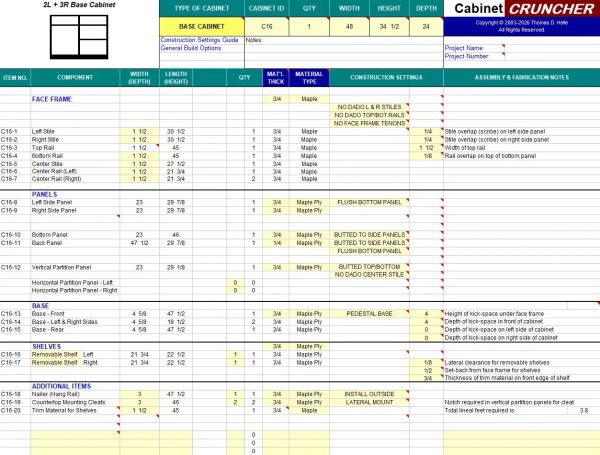
Configure CabinetCRUNCHER to match your construction methods, materials and shop preferences. Choose face-frame or frameless construction and customize settings for joinery, reveals, clearances, material thicknesses and other cabinet details. CabinetCRUNCHER applies your settings to calculate the components and cut lists for your projects.
Developed by engineers and cabinetmakers, CabinetCRUNCHER combines technical calculation with practical cabinetmaking experience.
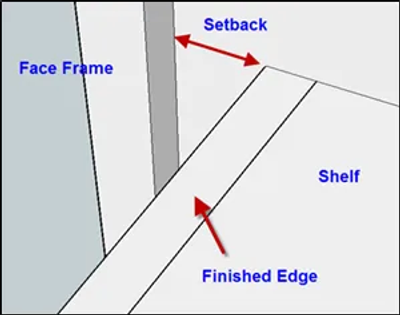
CabinetCRUNCHER combines cabinet calculations, cut lists, material planning and estimating tools in one practical system. It's designed for professional cabinetmakers, contractors, serious woodworkers and DIYers who build custom cabinetry.
Configure face-frame or frameless construction, joinery, materials, reveals, clearances and other settings to match your construction methods.
Generate cabinet component cut lists with dimensions and quantities to help organize cutting and construction.
Calculate plywood, hardwood, doors, drawer components and other materials needed for your projects.
Professional users can calculate material and labor costs and prepare project estimates before construction begins.
Use CabinetVIEW and SketchUp for 3D design, another design program, or work directly from your own plans and dimensions.
Have a question about CabinetCRUNCHER, your construction settings or getting started? We're available by phone or email to provide direct support and help you get the most from your software.
206-818-0109
sales@cabinetcruncher.com